

Leave type setup and leave category control
Create leave categories such as casual leave, sick leave, earned leave, or special leave so employee leave requests follow a controlled leave type structure.
NimuHR gives businesses a leave management software and leave request management system for leave policy setup, employee leave tracking, leave balances, leave approvals, leave requests, and leave analytics from one connected HR workspace.
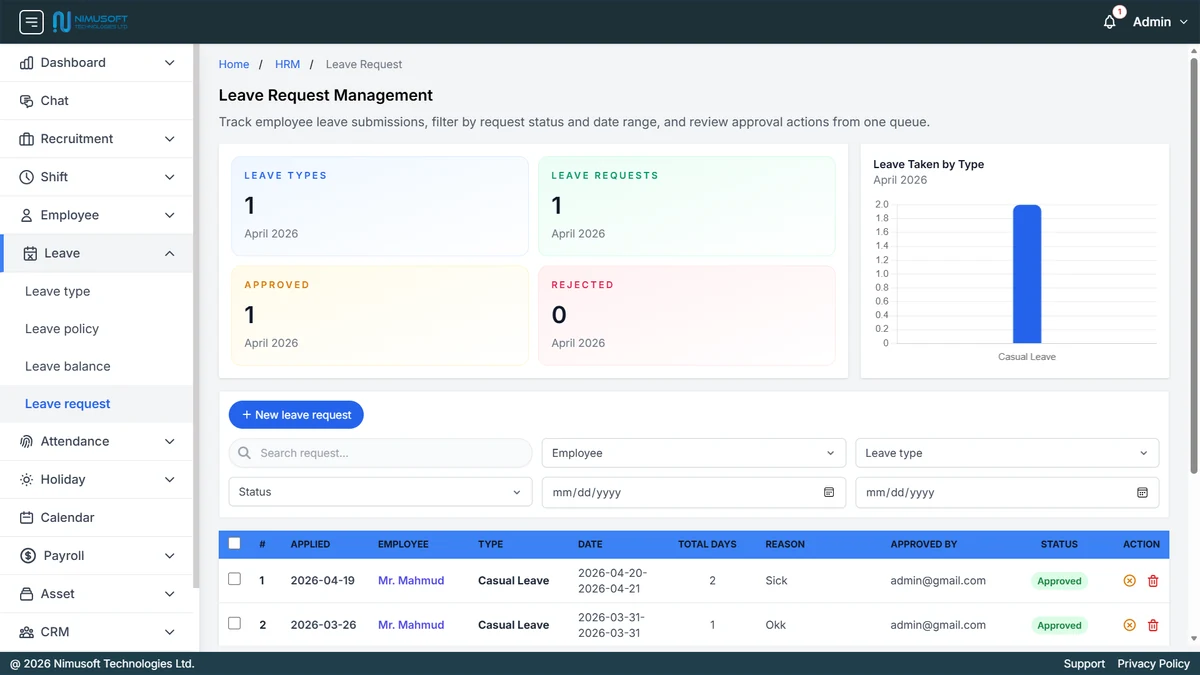
These leave management features reflect the actual NimuHR leave workflow, covering leave types, leave policies, employee leave balances, leave request management, and leave approval control.
Create leave categories such as casual leave, sick leave, earned leave, or special leave so employee leave requests follow a controlled leave type structure.
Define leave policy rules by department or leave type, including whether holidays are skipped and whether negative leave balance is allowed.
Maintain allocated, used, and available leave balances per employee so leave requests can be reviewed against real leave entitlement.
Review employee leave submissions from one leave request management queue with filtering by status, employee, leave type, and date range.
Approve or reject leave requests with status visibility and reviewer accountability so managers and HR have a cleaner leave approval trail.
See leave request counts, approvals, rejections, and leave taken by type so HR teams can spot leave trends and policy pressure quickly.
The leave request management system gives HR teams a structured way to define leave policy, assign leave balances, collect leave requests, and make leave approval decisions with better visibility.
Cleaner request handling
HR and managers can review employee leave requests from one place instead of email chains, chat messages, and manual forms.
Better policy control
Leave policy rules, holiday handling, and balance restrictions stay tied to policy logic instead of being decided ad hoc.
Balance visibility
Employees and reviewers get clearer visibility into available leave balances before leave approvals are made.
Connected HR workflow
Leave records stay connected with employee data, holidays, attendance, and payroll-ready reporting inside the wider HR system.
Best for
Businesses that need leave management software, leave request software, department-level leave policy control, employee leave tracking, and a more reliable leave approval workflow inside one HR platform.
Clear answers for teams comparing leave management software, leave request management systems, leave policy software, employee leave tracking software, and leave approval tools.
We can walk you through leave types, leave policies, leave balances, leave request review, approvals, and how leave stays connected with holidays, attendance, and payroll inside NimuHR.