

Face / FP / Palm
SpeedFace-V5L Series
High-capacity visible-light terminal for face, fingerprint, optional palm, card, password, ADMS, TCP/IP, and optional Wi-Fi.
ZKTeco detailsNimuHR connects supported ZKTeco biometric attendance devices successfully and fetches punch data over the internet into the attendance solution in real time. No USB export, no Excel import, no manual attendance collection.
16+
ZKTeco models
Live
Internet sync
Zero
Manual export
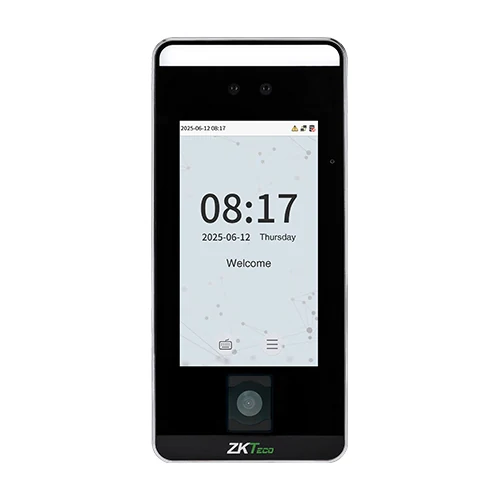
Face, fingerprint, palm, card, password, TCP/IP, optional Wi-Fi, ADMS and TA push support.
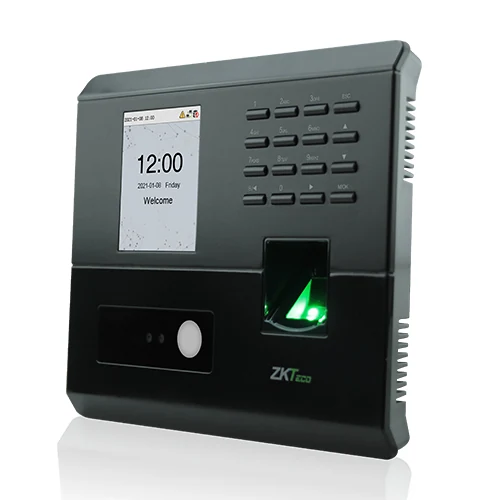
Touchless face and fingerprint attendance terminal with TCP/IP, USB Host, optional Wi-Fi, ADMS, and ZKBio Zlink support.
NimuHR device bridge
Once the device is connected to the internet and configured for the supported ZKTeco communication mode, punch events flow directly into NimuHR attendance for processing, exception review, dashboards, and payroll-ready reporting.
NimuHR is built for connected attendance operations. Biometric devices send punch data through the internet, NimuHR receives and validates those events, then the attendance engine maps each punch to employee records, shifts, late rules, overtime, and attendance summaries.
Face, fingerprint, palm, card, or PIN event is captured at the terminal.
Device data is fetched through supported network communication.
Raw logs are stored with device, employee, timestamp, and status context.
Dashboards, exceptions, overtime, and payroll inputs update from the live stream.
HR does not need to collect USB reports, import Excel files, or retype employee attendance from device screens.
NimuHR can monitor connected terminal status, last sync time, punch volume, and branch-wise attendance coverage.
Live device data becomes daily attendance, late minutes, overtime, absences, and exception records for payroll review.
The list below covers modern visible-light face terminals, palm and fingerprint devices, hybrid biometric terminals, and the commonly used K40. Final rollout depends on device firmware, network access, and the selected ZKTeco communication mode.
Face / FP / Palm
High-capacity visible-light terminal for face, fingerprint, optional palm, card, password, ADMS, TCP/IP, and optional Wi-Fi.
ZKTeco detailsFace / FP / Card
Hybrid biometric access and attendance terminal with visible-light face recognition and multiple verification methods.
ZKTeco detailsFace / Card / Palm
Modern IP66 visible-light facial authentication device with TCP/IP, optional Wi-Fi, PoE, and TA push support.
ZKTeco detailsFace / Palm
Face and palm authentication terminal for touchless attendance, branch entry, and modern employee verification workflows.
ZKTeco detailsFace / FP / Card
Compact face, fingerprint, card, and password terminal with TCP/IP and optional Wi-Fi for smaller entry points.
ZKTeco details7 inch terminal
Large screen SenseFace terminals for higher capacity face, fingerprint, card, and branch access workflows.
ZKTeco detailsEnterprise face
Enterprise-grade facial terminal for high-volume access and attendance sites needing robust capacity and fast verification.
ZKTeco detailsDual spectrum
Dual-spectrum ProFace terminal for tougher face-recognition environments and enterprise-grade identity control.
ZKTeco detailsAndroid / 4G
Compact Android facial recognition terminal with Wi-Fi, Bluetooth, 4G options, and face or fingerprint variants.
ZKTeco detailsFace terminal
Touchless facial identification attendance terminal for smaller teams that need simple live attendance capture.
ZKTeco detailsFace / FP
Visible-light face and fingerprint device for time attendance deployments with connected employee verification.
ZKTeco detailsFace / FP / Card
Multi-biometric time attendance terminal with visible-light face authentication, fingerprint, card, TCP/IP, and Wi-Fi option.
ZKTeco details4G optional
Hybrid biometric time attendance terminal with face, fingerprint, optional Wi-Fi, optional 4G, and backup battery support.
ZKTeco details7 inch hybrid
Large hybrid biometric access terminal for face, palm, optional fingerprint, card, and TCP/IP attendance operations.
ZKTeco detailsSME attendance
Affordable time and attendance terminals with face, fingerprint, RFID option, password, Wi-Fi, and ZKBio Zlink compatibility.
ZKTeco detailsFingerprint / TCP/IP
Popular fingerprint attendance terminal with TCP/IP and built-in battery. NimuHR connects through network-based sync for live attendance flow.
ZKTeco details1. Device and firmware validation
We confirm the exact ZKTeco model, firmware, communication mode, site network, and branch mapping before rollout.
2. Secure network configuration
The device is configured for internet-based communication to the NimuHR attendance bridge with the required server address, port, and mode.
3. Employee and device mapping
NimuHR maps device users to employee records, branch, department, shift, and attendance policy for clean processing.
4. Live monitoring and reporting
Attendance logs update dashboards, raw punch views, daily attendance records, late minutes, overtime, and payroll inputs.
Real-time punch stream
See check-in and check-out data as the device sends logs to NimuHR.
Branch-wise device control
Track which terminal belongs to which branch, floor, gate, factory, or office location.
Exception visibility
Missed punches, duplicate logs, late arrivals, and device offline cases become visible quickly.
Attendance to payroll
Processed attendance can feed payroll calculations with fewer corrections and cleaner review.
Compatibility can vary by region, firmware, and enabled protocol. Nimusoft validates each model before production connection so the integration is stable for daily operations.
Clear answers for teams connecting ZKTeco attendance devices with NimuHR.
Share your device model, firmware, branch count, and attendance rules. Nimusoft can validate the setup and connect live biometric data into the NimuHR attendance solution.