


From procurement to cash out
Requisition, order, receipt, bill and payment. Keep purchasing commitments and settled amounts clearly visible.
Bring every financial movement into focus. From a sale to a settlement, from a warehouse to your balance sheet—see the whole business working together.
Less chasing numbers. More moving forward.Six core modules. One clear financial picture.
Closing balance: 149,000 taka.
A COMPLETE FINANCE WORKSPACE
From a purchase request to a supplier payment. From a customer quotation to cash collected. Give each team the tools to keep work moving.
Banking, journals, reconciliation, and financial reporting.
Explore moduleSuppliers, purchasing, bills, and payments.
Explore moduleCustomers, quotations, invoicing, and collections.
Explore moduleCompany spending and employee expense approvals.
Explore moduleOwnership, depreciation, maintenance, and disposal.
Explore moduleItems, warehouses, batches, and stock movements.
Explore moduleFOLLOW THE MONEY. KEEP THE CONTEXT.
From an accepted quotation to a customer receipt. From a purchase request to a supplier payment. Follow each handoff and see when money actually moves.
Keep quotations, orders, invoices and receipts connected. See what has been agreed, what has been billed and what has reached your bank.
Sales workflow: quotation, step 1 of 4.
Requisition, order, receipt, bill and payment. Keep purchasing commitments and settled amounts clearly visible.
Category, receipt, responsible person and approval decision. Know what is waiting and what has been paid.
Keep invoiced revenue, customer receipts and outstanding balances in view, alongside your period results.
THE PICTURE BEHIND THE PROFIT
GOOD BOOKS START WITH GOOD STRUCTURE
Build clarity from the ground up. A structured chart of accounts connects the individual transaction to the ledger, the trial balance and your financial reports.
Cash, customer receivables, inventory and equipment, organized in one account class.
1100Cash & bankAsset1200Accounts receivableAsset1300InventoryAsset1500Property & equipmentAsset✓ Debits and credits agree. The customer balance clears.
Showing Asset accounts.
LESS CHASING. MORE CLARITY.
Work with the records behind the numbers. Check a supplier’s outstanding bill, review an employee’s claim, find an asset, or follow stock across warehouses—all within the Finance workspace.
See the complete feature listOverdue invoices, open orders, pending expenses, and stock or lot indicators make follow-up easier.
References, linked documents, dates, notes, and responsible people help explain each transaction.
App and action permissions help teams manage access to records and approval decisions.
FINANCIAL CLARITY MEETS PHYSICAL STOCK
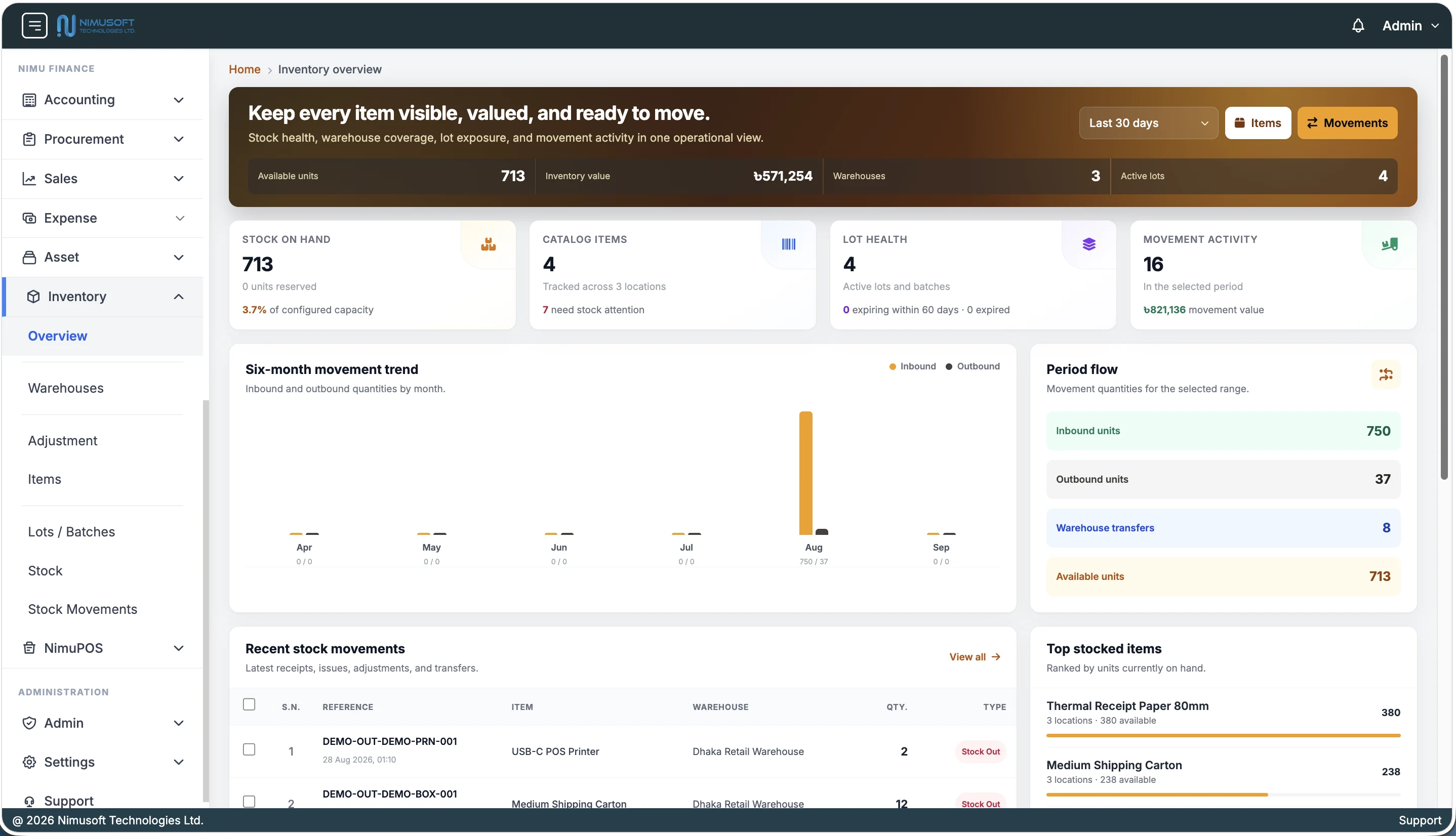
Know what is available, where it belongs and how it got there. Bring warehouses, stock quantities, lots and inventory value into one connected view.
Move 12 units from Dhaka HQ to Chattogram.
Organize warehouses by zones, shelves and bins, with separate visibility for item variants and available quantities.
Connect receipts, issues, returns, transfers and adjustments with dated references and movement filters.
Review low-stock indicators, reserved quantities, batch references and expiry dates before they become surprises.
OWN THE FULL PICTURE
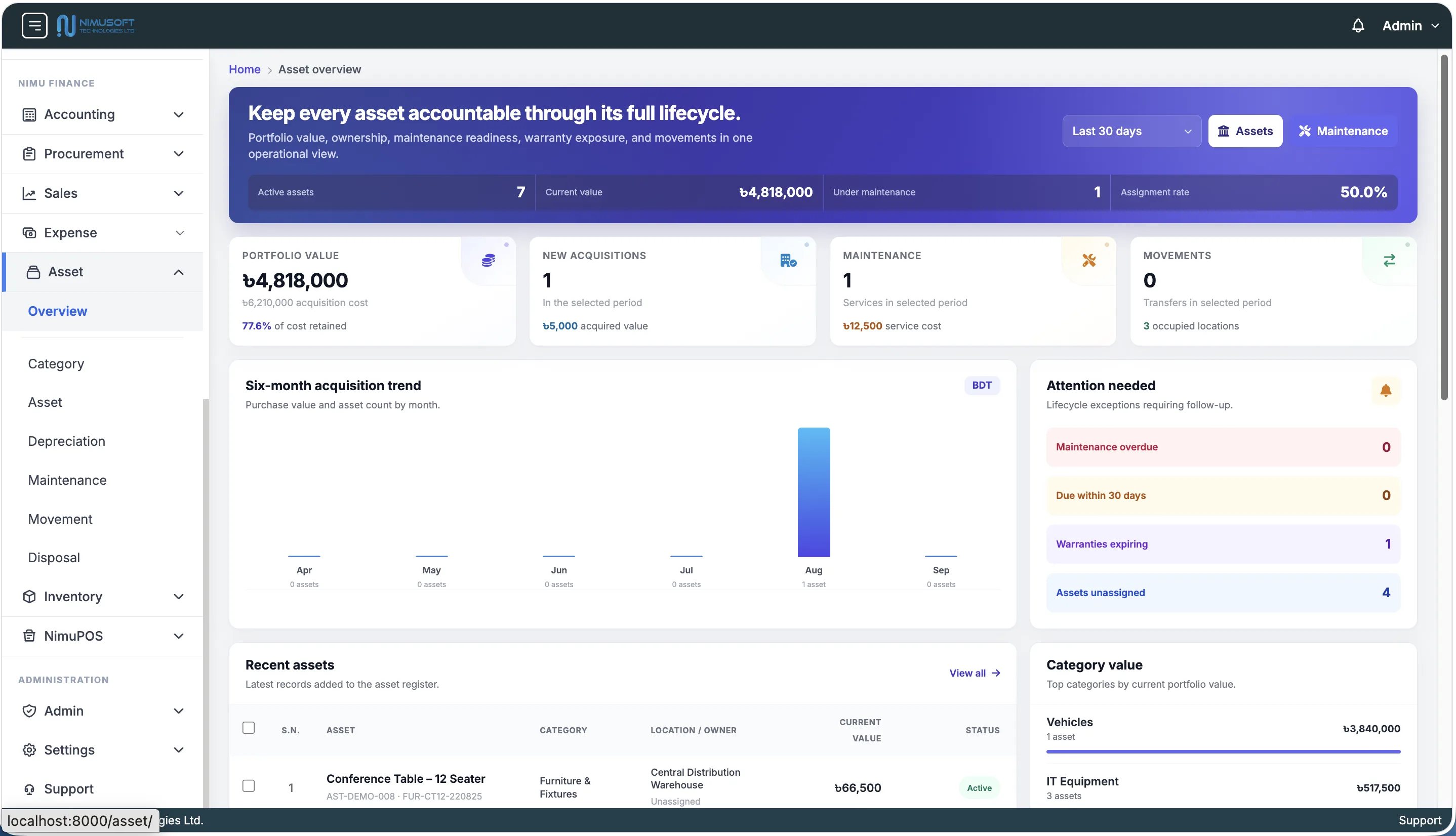
From the day it arrives to its final handover. Keep purchase cost, ownership, location, depreciation and maintenance together in a traceable asset history.
Tags, serial numbers, suppliers, documents and assigned users.
Useful life, depreciation records and book value over time.
Maintenance dates, service costs and warranty information.
Transfers, locations and disposal details, with responsibility attached.
Dhaka HQ · Creative team
Assigned. Located. Accounted for.Straight-line · 5-year life · ৳ 20,000 residual value
Year 2: book value 80,000 taka; accumulated depreciation 40,000 taka.
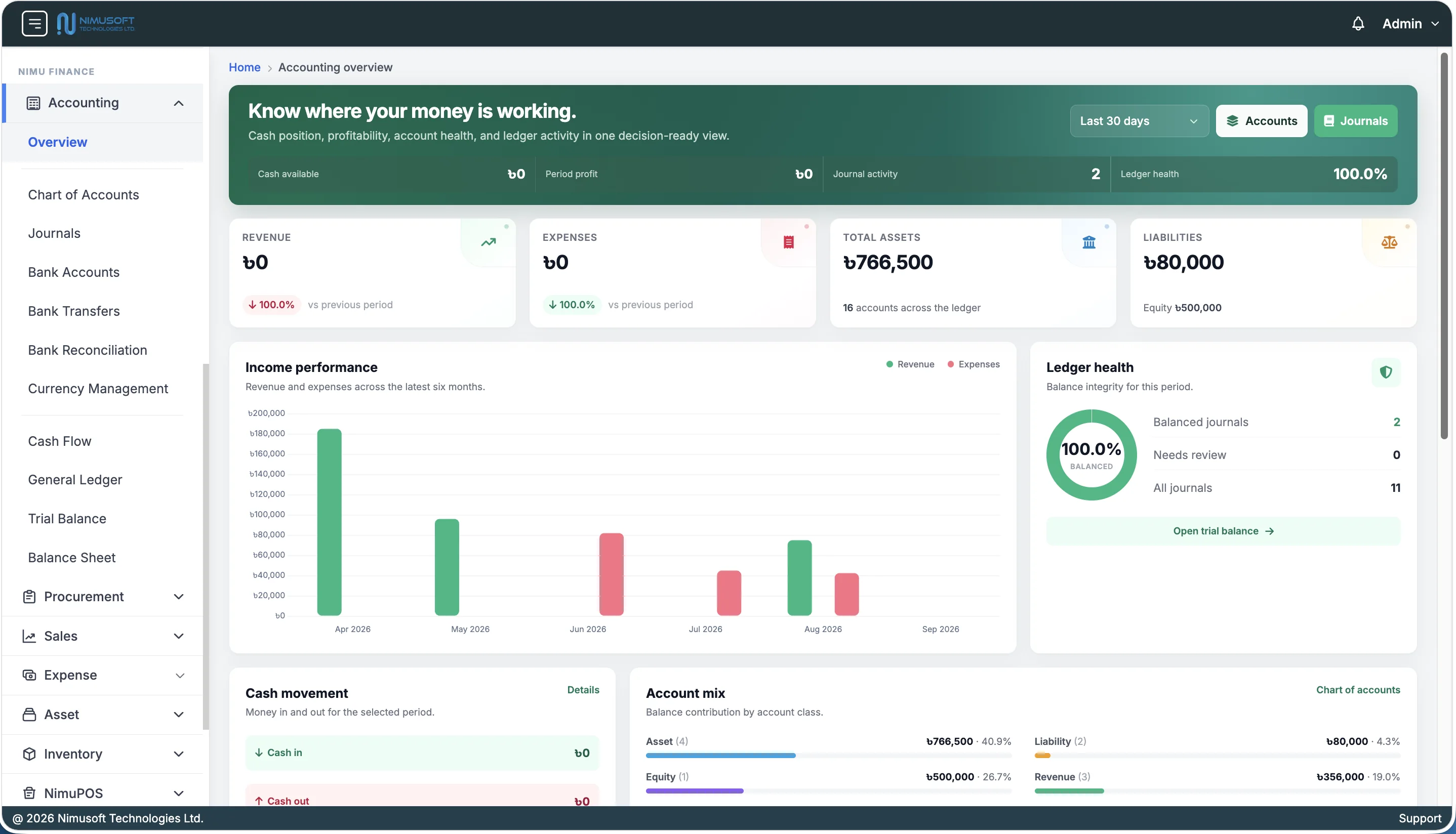
01 / ACCOUNTING
Bring your chart of accounts, double-entry journals, managed bank accounts, transfers, reconciliation, and financial reports into one workspace. See revenue, expenses, period profit, cash movement, and ledger health together.
 Explore screenshot ↗
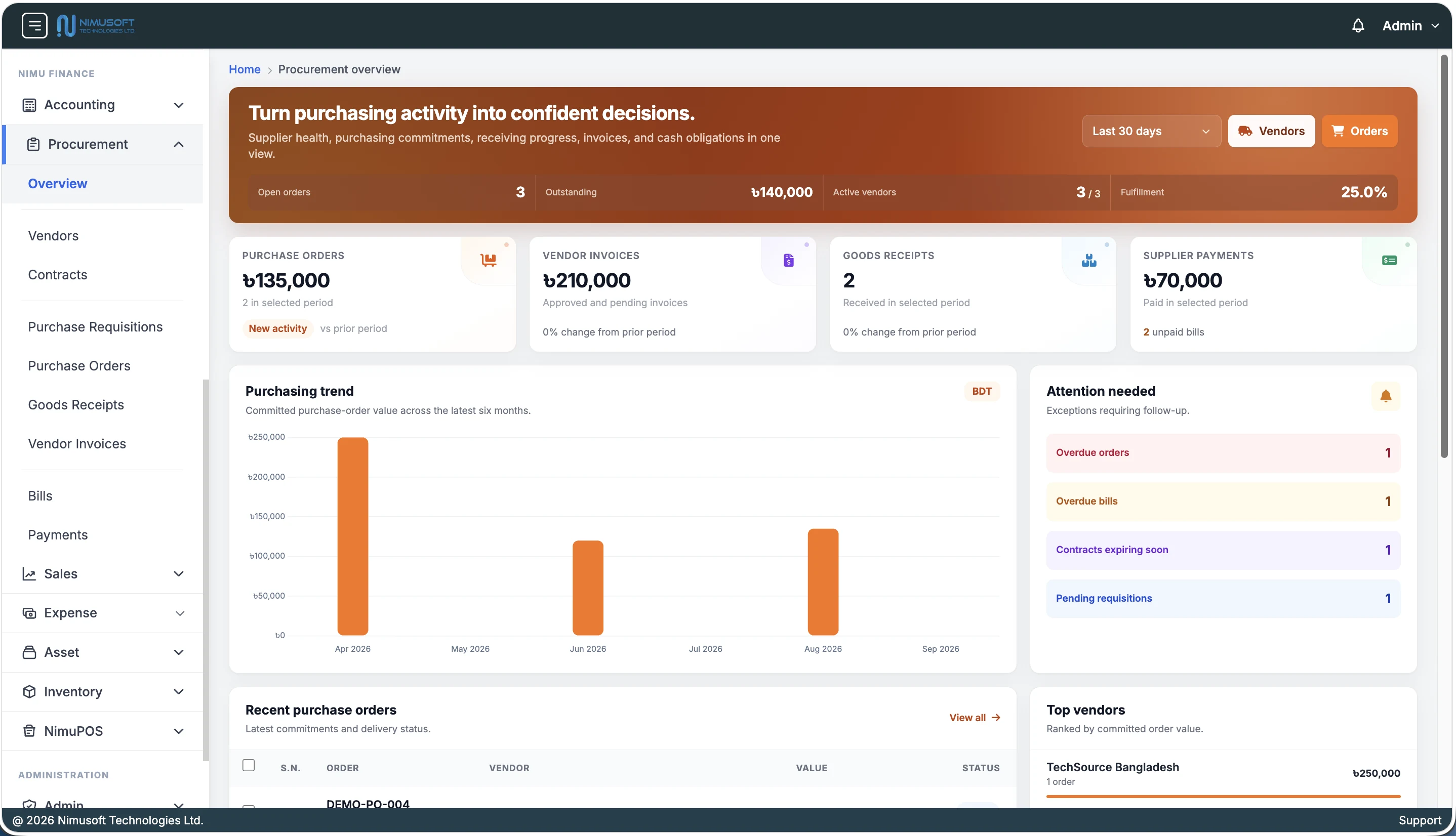
02 / PROCUREMENT
Follow purchasing from the initial request through supplier payment. Keep vendors, contracts, purchase orders, goods receipts, and invoices connected so your team can see its commitments and what still needs attention.
 Explore screenshot ↗
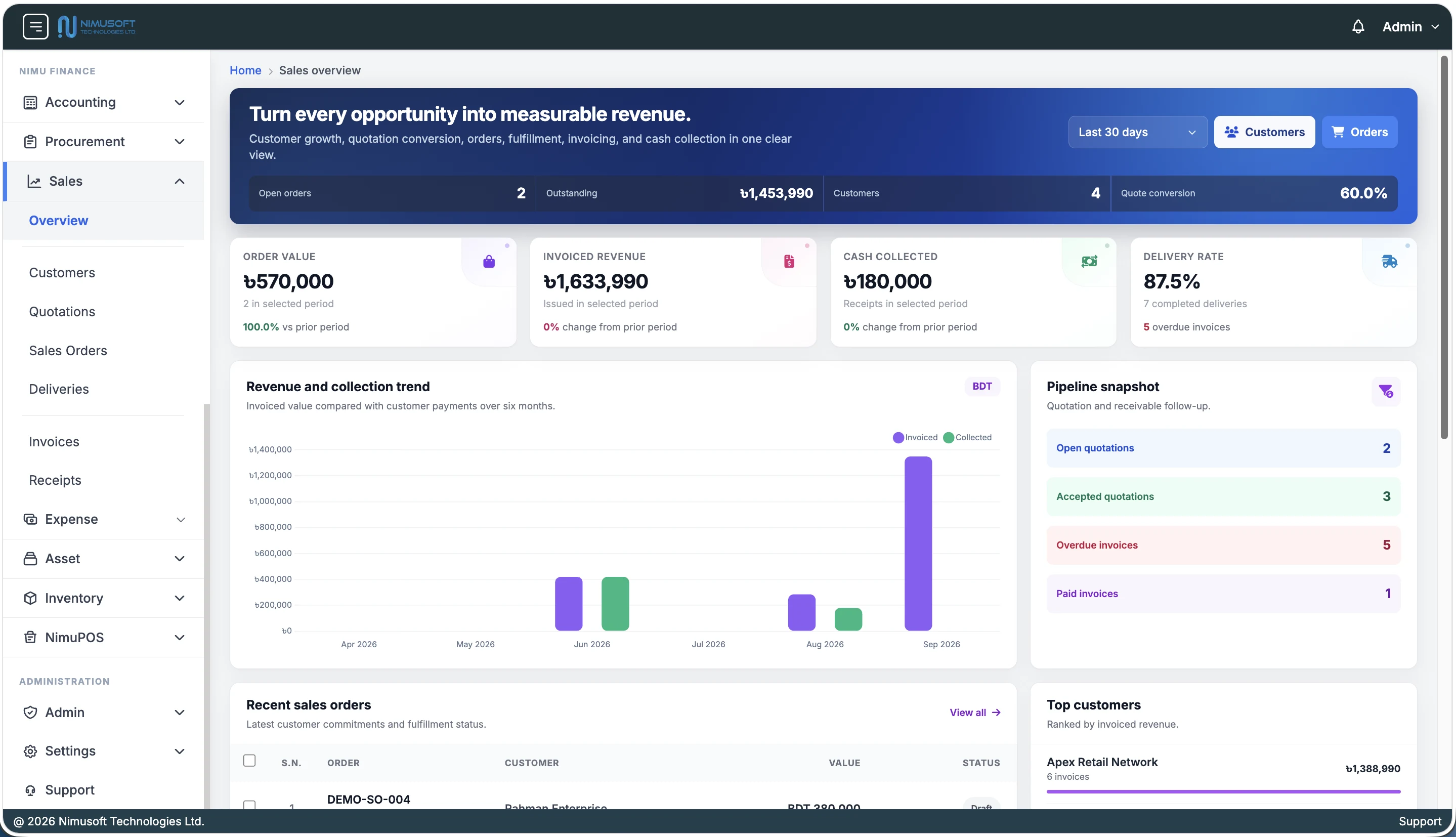
03 / SALES
Give sales and finance a shared view of the customer journey. Move from quotation to order, delivery, invoice, and receipt while keeping fulfilment progress and outstanding customer balances visible.
 Explore screenshot ↗
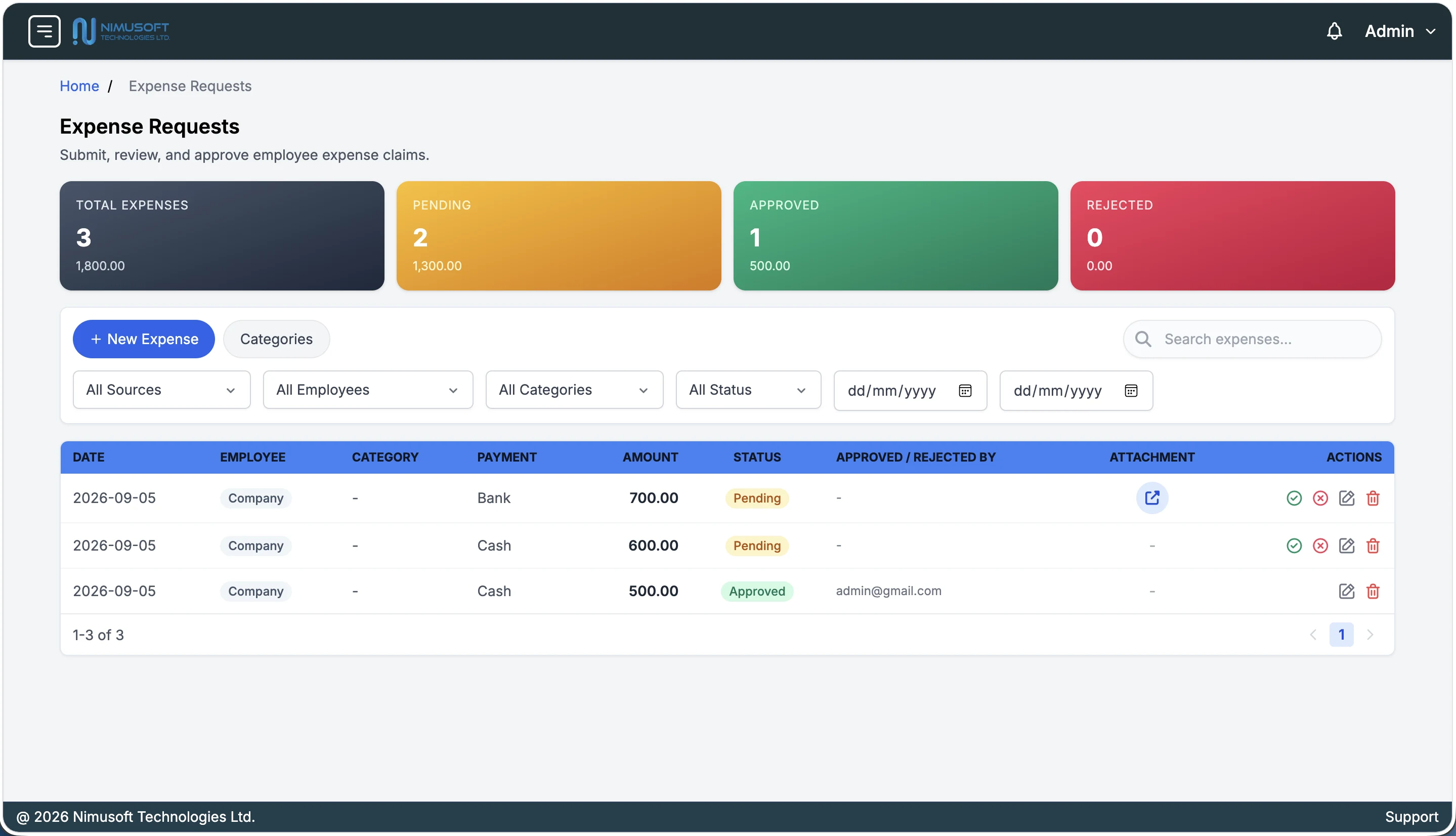
04 / EXPENSE
Keep company spending and employee claims in one review queue. Capture categories, payment details, and supporting documents, then record the decision and the person responsible for approval.
 Explore screenshot ↗
05 / ASSET
Know what your business owns, where it is, who uses it, and how its value changes. Bring purchase details, depreciation, warranty coverage, maintenance, movements, and disposal into one asset history.
 Explore screenshot ↗
06 / INVENTORY
Bring your item catalogue and warehouse operations into the same view. Track stock on hand, available quantities, inventory value, lots, and movements across locations, with the detail needed to investigate every change.
 Explore screenshot ↗
NIMU FINANCE / INVOICE STUDIO
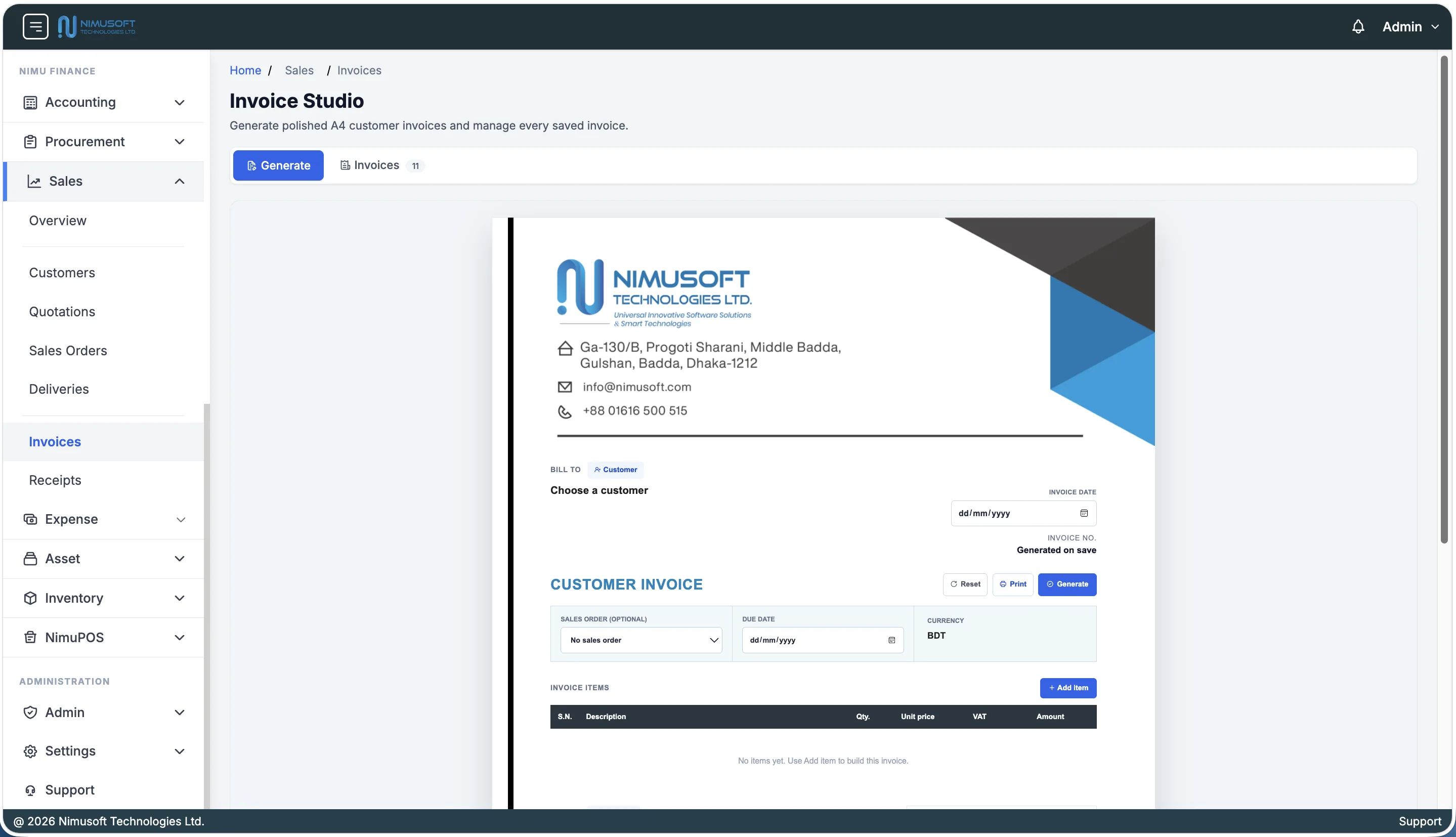
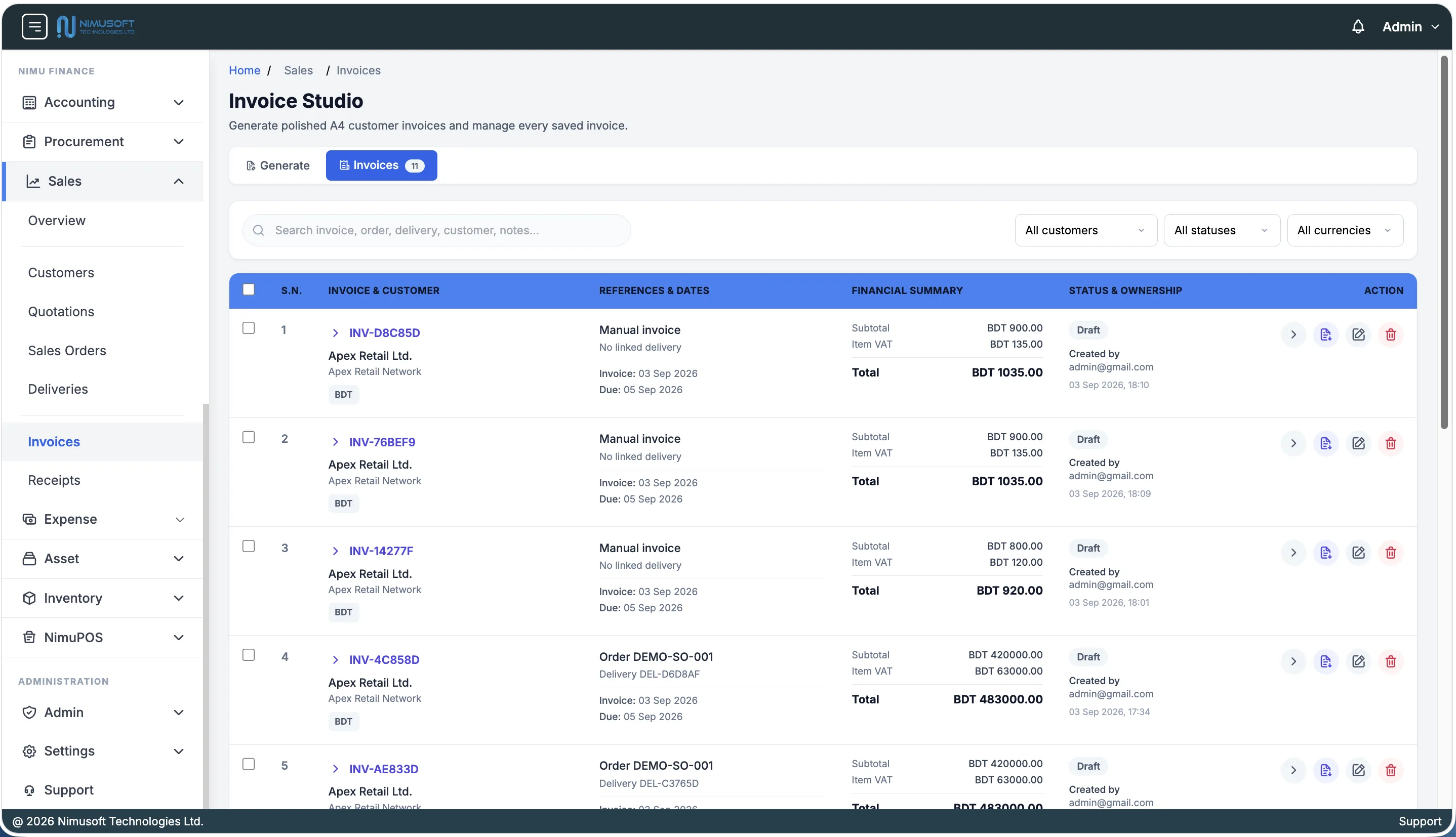
Turn every customer bill into a polished business document. The customizable Invoice Studio brings live A4 composition, accurate totals, branded approval details, PDF generation, and a complete invoice workspace together.
Choose a customer or sales order, set dates and currency, then build VAT-aware line items while the A4 invoice takes shape.
Customize discounts, notes, finance ownership, authorized signature, company seal, and QR-backed invoice details.
Preview, print, save, and download a numbered professional PDF without rebuilding the document in another tool.
Search and filter by customer, status, or currency; review totals and references; then open, export, edit, or remove records.
 Explore builder
 Explore management
BUILT AROUND HOW BUSINESS WORKS
Move between related records with a clear reference for each step.
Capture a requisition, review approval, and create a supplier order.
Record goods receipts and review the related vendor invoice.
Manage the bill, record payment, and allocate it against the balance.
Prepare a quotation with terms and connect it to a sales order.
Track order fulfilment and issue an invoice with a due date.
Record receipts and keep outstanding customer invoices visible.
THE COMPLETE FEATURE DIRECTORY
Explore the full module and feature list. Select a module to see the capabilities your team will use every day.
Revenue, expenses, assets, liabilities, period profit, cash position, and six-month income trends.
Unique account codes, five account classes, balances, notes, and cash-account identification.
Inspect an account’s dated transactions and balance movement.
Multiple debit and credit lines, balance validation, references, and account or date filters.
Connect institution and account details to cash asset ledgers, currencies, book balances, and active banking status.
Move funds between managed bank accounts with balanced source and destination postings and an auditable transfer history.
Import Excel or CSV statements, match bank lines to ledger entries, post controlled adjustments, and close reviewed periods.
Review money entering and leaving cash-designated accounts for a selected date range.
Review opening balances, period debits and credits, and calculated closing positions by account.
Verify opening balances, period movements, and closing debit and credit equality.
Review assets, liabilities, contributed equity, and current earnings for your reporting date.
Purchase commitments, receiving progress, outstanding bills, vendor rankings, and follow-up indicators.
Supplier contacts, company details, tax IDs, bank information, notes, and payable accounts.
Contract numbers, start and end dates, values, currencies, terms, and attached documents.
Department requests, purpose, item quantities, estimated prices, and approval status.
Link requisitions and contracts; track expected dates, discounts, tax amounts, and receiving status.
Record received quantities against purchase-order lines and follow verification status.
Link invoices to orders, review tax and due dates, and manage open or partially paid bills.
Record bank, cheque, cash, or mobile-money payments; allocate amounts to bills and see remaining balances.
Order value, invoiced revenue, collected cash, delivery rate, quotation conversion, and customer rankings.
Customer contacts, company and tax details, notes, and linked receivable accounts.
Itemized proposals with validity dates, quantities, prices, discounts, tax, and acceptance status.
Orders linked to quotations, expected delivery dates, line quantities, terms, and status.
Delivery references and dated fulfilment records linked to sales-order lines.
Standalone or order-linked invoices with due dates, line-level VAT, discounts, and payment status.
Invoice-linked cash, bank, card, or cheque receipts with partial and full payment tracking.
PDF quotations, sales orders, delivery notes, and branded invoices with QR codes and signature options.
Employee-linked claims and company expenses with amount, date, and payer.
Organize spending into named categories with supporting notes.
Record cash, bank transfer, card, and online payment details.
Keep uploaded receipts and documents alongside the expense record.
Permission-controlled decisions with reviewer, decision time, and approval notes.
Pending, approved, and rejected counts and amounts with searchable, filtered expense lists.
Category codes, useful lives, depreciation methods, and rates.
Unique tags, serial numbers, vendor and purchase details, current value, and operational status.
Assigned users, warehouse locations, warranty expiry, images, and notes.
Calculate and record depreciation amounts, accumulated depreciation, book values, and posting status.
Preventive or corrective work, service dates, next due dates, costs, and service providers.
Source and destination locations, movement dates, responsible users, and transfer notes.
Disposal dates, reasons, proceeds, and approver details.
Store named supporting files against each asset’s record.
Stock quantities and value, warehouse coverage, low-stock attention, lot expiry, and movement trends.
Warehouse types and capacities with zone, shelf, and bin organization.
Categories, item types, brands, units, SKUs, barcodes, and QR codes.
Item variants and attributes with separate identification and stock visibility.
Lot references, source details, vendor links, and manufacturing or expiry dates.
On-hand and reserved quantities, available stock, and stock-status indicators.
Dated receipts, issues, returns, and movement references with warehouse and item filters.
Increase or decrease stock and record transfers between source and destination warehouses.
PART OF YOUR NIMUSOFT WORKSPACE
Six core Finance modules, supported by platform administration and the wider Nimusoft product family.
Manage users, user groups, app access, and permissions for individual actions. Assign responsibility for financial records and supported approvals.

Keep employee expense claims connected to employee records, and assign business assets to users. Explore the broader HR suite for people operations.
Explore NimuHR
Extend your workspace to restaurant operations with ordering, tables, kitchen tickets, payments, customers, and centralized POS controls.
Explore NimuPOSA FEW THINGS TO KNOW
Want to see how Nimu Finance fits your business?
Talk to our teamNimu Finance is Nimusoft’s business finance platform. It brings Accounting, Procurement, Sales, Expense, Asset, and Inventory into a shared workspace for day-to-day financial and operational control.
The Accounting app includes account statements, cash flow, general ledger, trial balance, and balance sheet. Its overview also shows revenue and expense trends, period profit, cash movement, and journal balance health.
Yes. You can connect managed bank accounts to cash asset ledgers, transfer funds with balanced journal postings, import Excel or CSV statements, match bank lines to ledger entries, post controlled adjustments, and close reviewed reconciliation periods.
Yes. Procurement records supplier payments and allocations against bills, including partial payments. Sales records customer receipts against invoices and tracks outstanding and overdue balances.
Yes. Inventory supports multiple warehouses, zones, shelves, bins, lots, and stock transfers. Asset records can reference warehouse locations and assigned users, with separate movement and maintenance histories.
Yes. The platform uses app permissions, user groups, and action-level permissions. Finance workflows include controls for viewing, creating, updating, deleting, and approving records where supported by the module.
The Nimusoft suite includes shared employee records for expense claims and user assignments for assets. NimuPOS adds restaurant sales and operational controls. In your demo, we can review the apps and workflows needed for your business.
Request a Nimu Finance demo to review the modules with our team. Share your users, locations, existing records, and reporting needs so we can discuss setup, migration requirements, training, and a quote for your scope.
MAKE ROOM FOR BETTER DECISIONS
See your finance workflows come together. Let’s walk through Nimu Finance with your team.
Tell us about your team, locations, and the modules you need.